
4K or 1080p? What the extra pixels buy in a meeting-room camera
Every webcam catalogue now splits into two shelves: 1080p and 4K. The 4K shelf costs more, and the quick justification — “sharper video calls” — is mostly wrong. A face on a video call does not need 4K. What the extra pixels actually buy is room to move: cropping, readable detail, and a camera that can do a second job without a second device. This article separates what 4K genuinely changes from what the box implies, and gives you a decision rule you can apply per product, not per marketing department.
What 1080p already does well
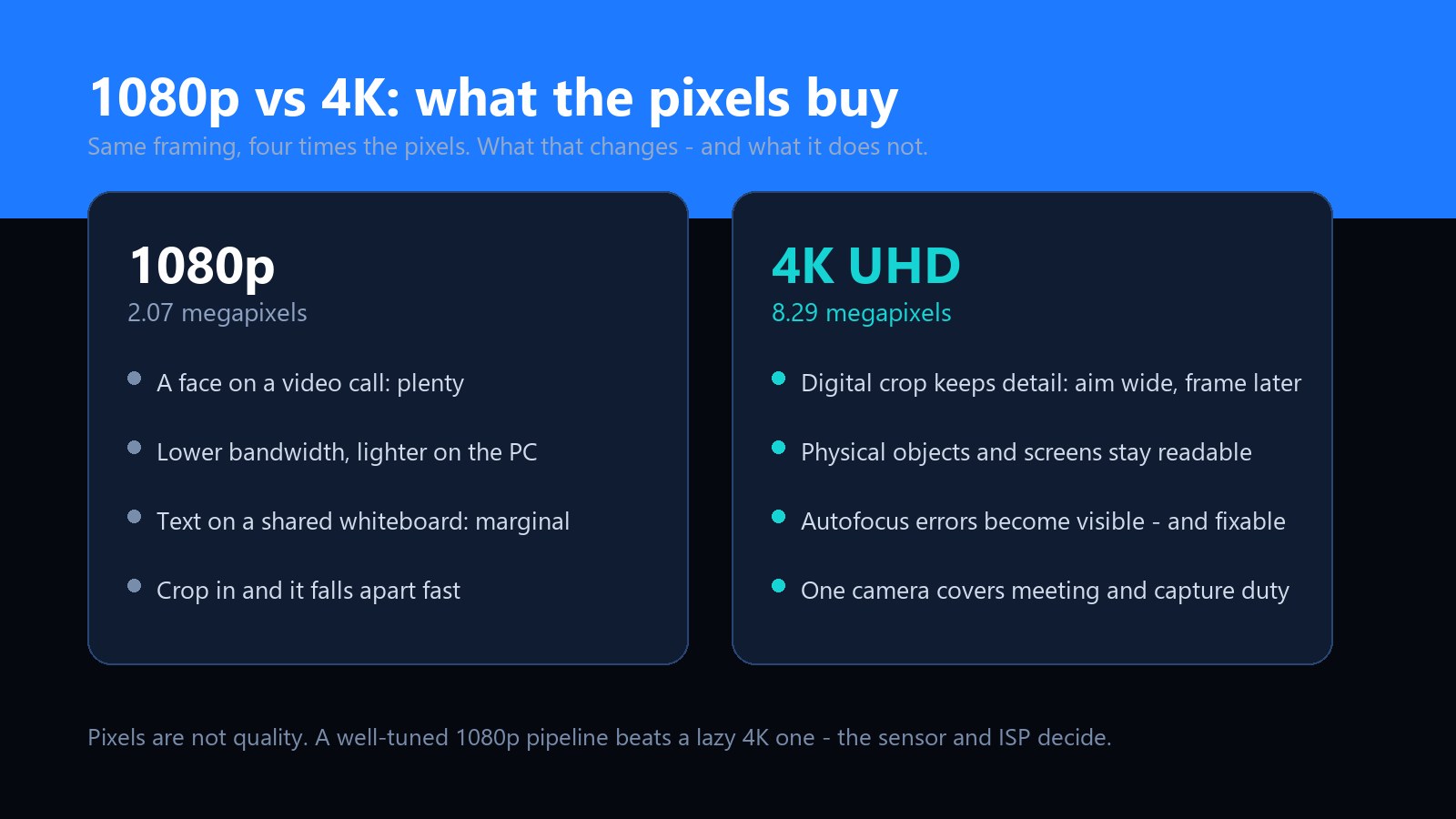
Start with respect for the incumbent. For the core meeting-room job — one or two faces, framed mid-chest, sent to a call — 1080p at 30 fps is fully sufficient. Every conferencing platform downscales to the call's shared resolution anyway, the encoder runs lighter on older office PCs, and a well-tuned 1080p pipeline with good exposure and clean colour beats a lazy 4K pipeline every single time. Most complaints about meeting-room video are lighting and autofocus complaints, not resolution complaints.
So the honest question is not “is 4K sharper”. It is: does this room, or this product, need the headroom that 8.3 megapixels provides?
What 4K actually buys
1. Crop headroom: aim wide, frame later
Four times the pixels means you can take a centre crop — two times tighter in each axis — and still have a full-HD image left. That single fact changes how a camera gets positioned: frame the whole table, the whiteboard and the demo bench, then let software take the tight shot digitally. Without the headroom, a digital zoom is just mush. This is the quiet reason 4K cameras replaced PTZ units in a lot of small rooms: no motor, no latency, no second failure mode.
2. Detail stays readable when the camera points at things
The moment a meeting camera is asked to show objects — a product sample held to the lens, a patch of skin, a screen, a page of a notebook — resolution stops being cosmetic. At 1080p, text on a shared whiteboard is marginal and a component under inspection is a suggestion. At 4K, the remote side can pause, crop and read. For any workflow where the camera doubles as an inspection or documentation tool, this is the whole argument.
3. Autofocus errors become visible — and fixable
Phase-detection autofocus (PDAF) is one of those specifications that sounds abstract until you have used it. On a 1080p stream, a hunting focus is annoying; on a 4K stream you can see exactly what the camera locked onto, which makes focus behaviour something you can evaluate and tune rather than tolerate. If you are building cameras rather than buying one, that visibility is a development tool.
4. One camera, two jobs
A 4K unit covers the meeting and the capture job: recording a demo, documenting a sample, feeding a kiosk or a telehealth consult that needs the still frame to be useful. Buying 1080p for calls and a separate camera for capture is a perfectly rational budget decision — but when one device can do both, the second device quietly disappears from the purchase order.
The bandwidth conversation
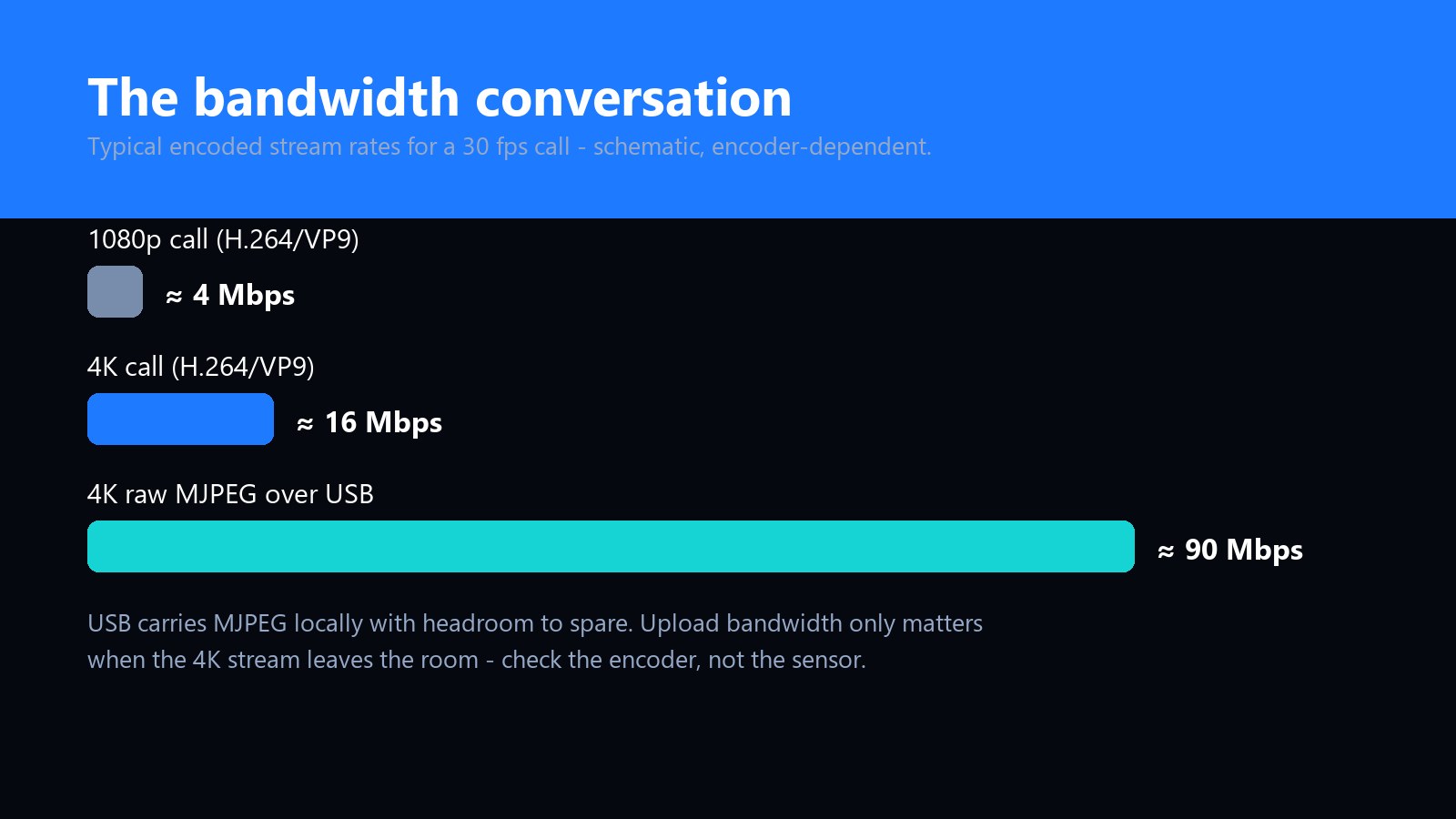
Bandwidth is where 4K decisions get made, and it splits into two separate links that often get confused:
- Camera to computer (USB). A UVC camera delivers Motion JPEG, and 4K30 MJPEG is a wide pipe — comfortably within what a modern USB port carries, but worth checking on the spec sheet rather than assuming.
- Computer to the world (network). This is the link that matters for the call. A 4K encoded stream typically runs a multiple of its 1080p equivalent, and if the room's upload is already busy, the platform will quietly drop the call back to 1080p — which is fine, and is exactly why the camera should be negotiated as UVC and left to the app to manage.
The honest case against 4K
Three real ones, in order of how often they bite:
- A bad 4K is worse than a good 1080p. Resolution is the easiest number to print on a box and the hardest to tune. A cheap 4K module with an untuned ISP produces noisy, late-sharpened video that looks worse on a call than a competent 1080p unit. Judge cameras by samples, not sensors.
- Low light does not care about pixels. Smaller pixels gather less light per photosite. In a dim room, a well-exposed 1080p camera often wins on the very thing viewers notice most.
- Not every seat needs headroom. A huddle-room face camera that will never crop, never document and never double as an inspection tool is spending money on capability nobody uses.
The decision rule
Choose by the second job, not the first. If the camera only ever carries faces to a call, buy 1080p and spend the difference on lighting. If it will ever crop, document, demo or inspect, 4K pays for itself — provided the ISP behind the sensor is actually tuned.
If you are specifying cameras for a product line
For OEM and ODM buyers, the 4K-or-1080p question is really a question about what the programme is for: a 4K SKU needs its ISP profile tuned per housing and per lens, and its bandwidth story documented for the customer's IT department. Done properly, the steps are the same ones described in our OEM/ODM briefing — samples first, tuning against real scenes, and the interface decision made per station the way the WiFi-versus-USB analysis lays out.
Our own reference design, the UB-A4K, takes the 4K side of this argument: 3840×2160 at 30 fps with phase-detection autofocus, a separate infrared camera for Windows Hello face sign-in, and standard UVC enumeration with no driver on Windows, macOS, Linux or Chrome OS — OBS, vMix and conferencing apps all see a normal video device, and the image stays sharp and steady for the length of a live stream. The aluminium housing with a magnetic cover is available for programmes that want the premium version.
Common questions
Is 4K worth it for everyday video calls?
By itself, no — the call gets downscaled anyway. 4K is worth it when the camera has a second job: cropping to a whiteboard or demo, capturing stills that need to be readable, or feeding an inspection workflow. If none of those apply, a well-tuned 1080p camera with good lighting is the better spend.
Does a 4K camera need USB 3.0?
It depends on the format, not the resolution label. Encoded streams fit comfortably in modest USB bandwidth; raw 4K Motion JPEG at 30 fps needs a fast port, which is why the camera's spec sheet should list its interface and formats together. Check them as a pair — a “4K” camera that silently falls back to 1080p MJPEG on an underpowered port is a common surprise.
Will a 4K UVC camera work with our conferencing software?
Yes. Standard UVC enumeration means the app sees a normal video device and offers whatever modes the camera reports; most platforms let the user pick 1080p even when the camera can send 4K, which is a useful way to test both paths. No driver, no plugin.
Can digital zoom on a 4K camera replace a PTZ unit?
In small and mid rooms, usually yes. A 4K sensor holds a 2× centre crop at full 1080p quality, which covers most table and whiteboard framing without a motor. Large rooms with real optical-zoom requirements are still PTZ territory.
Does 4K make Windows Hello face sign-in better?
No. Windows Hello uses a separate infrared camera — resolution on the colour sensor is irrelevant to it. The two are independent: the UB-A4K pairs a 4K colour camera with a dedicated IR camera, and the colour stream keeps running while Hello reads the IR one.
We are an OEM — should our line carry 1080p, 4K or both?
Both, sold by the second job. Position 1080p as the volume SKU for pure calling, and 4K for anything that crops, documents or demos — then make sure the 4K SKU's ISP tuning and bandwidth documentation justify its price. If sensor supply is a concern on either line, tell us your volumes early; we keep qualified alternatives so a shortage does not restart image-quality work.