
What does 10–200× magnification actually mean?
Every handheld digital microscope box prints a range like 10–200×, and nearly every buyer reads it the way they read a traditional eyepiece: bigger number, more detail. The truth is stranger. A digital microscope's magnification is not a property of the instrument at all — it is a property of the instrument plus whatever screen it happens to be driving. Two buyers using the identical camera can be looking at magnifications an order of magnitude apart, and both numbers are correct. This article explains where the number comes from, why piling on more of it stops buying you detail, and how to judge a camera by something you can actually verify.
The number is a convention, not a lens property
A traditional microscope's magnification lives in its optics: objective times eyepiece, done. A digital microscope has no eyepiece, so the enlargement you actually experience is the product of two separate factors:
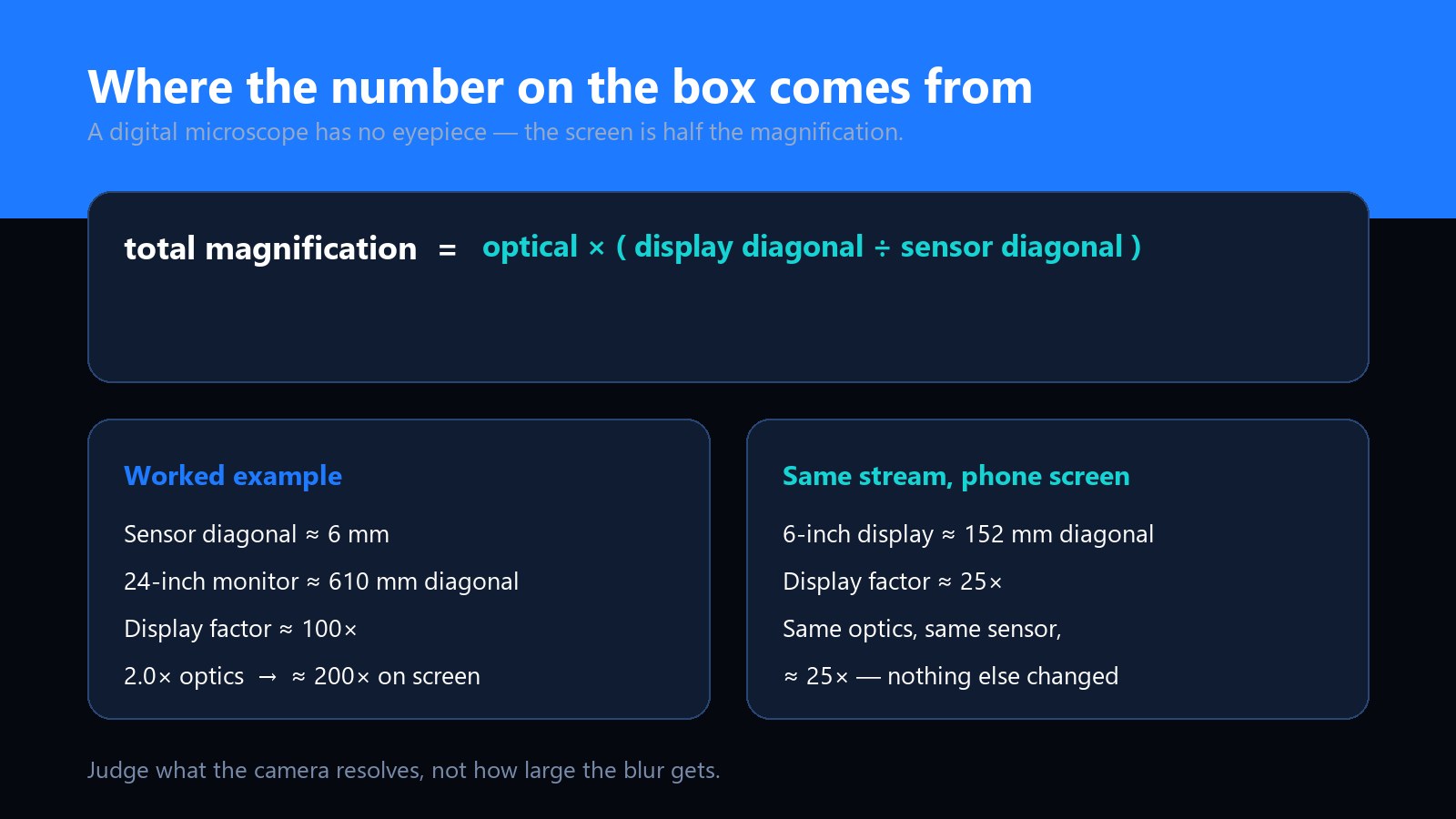
total magnification = optical magnification × (display diagonal ÷ sensor diagonal)
The second factor is where the trouble starts. As a worked example: a compact sensor with a diagonal of roughly 6 mm, shown full-screen on a 24-inch monitor with a diagonal near 610 mm, carries a display factor of about 100×. Two times of optical magnification therefore lands on screen as 200×. Take the same live stream to a 6-inch phone screen and the factor drops to roughly 25× — the optics did not change, the sensor did not change, only the display did.
This is not a trick; it is the only honest way to express enlargement for a device without an eyepiece. But it means the range printed on the box is measured against a reference display, and it explains two things buyers notice in the field: the "10×" end of a handheld scope looks far less dramatic than a 10× loupe, because part of that figure lives in the screen; and connecting the same camera to a bigger monitor makes everything look more "magnified" without resolving anything new.
What actually resolves detail
If display size does not buy detail, what does? Two things, working together:
- The optics. How finely the lens and its aperture can separate two nearby features. This is fixed physics — it sets a ceiling no screen can raise.
- The sensor sampling. The smallest feature the camera can record needs to land across at least two pixels. Fewer pixels across the same field of view means the sensor cannot even record what the lens resolves.
Beyond the lower of those two limits, extra magnification is what opticians call empty magnification: the blur gets bigger, not better. It is the most common disappointment in this product category — a camera that promises 200×, delivers an enlarged soft image, and the buyer concludes the factory lied when in fact the optics ran out two screens ago. Magnification you cannot use is not a spec; it is a bigger picture of the same information.
Why 2MP and 5MP feel different
Sensor resolution enters through sampling. Across the same field of view, a 5-megapixel sensor has roughly twice the linear pixel density of a 2-megapixel one — twice as many pixels across, and so twice as fine a feature it can record. That is why our UB-DM050U bench model can sit at the top of its range and still hold readable detail, while a 2MP sensor is best worked in the middle of its range. The trade is light: smaller pixels gather less of it, which is why the 5MP unit lives on a stand with proper illumination rather than in a free hand. We went through this trade in detail in 2MP versus 5MP — the short version is that sensor count decides how much of the optics' work gets recorded, and lighting and optics decide whether there was any work worth recording.
Field of view: the other half of every magnification claim
Magnification and field of view are two ends of one lever. At the wide end of a 10–200× range you can see a whole coin; at the long end you are looking at a patch of its surface smaller than a grain of rice. Neither is more useful — they are for different jobs — but buyers are often surprised by how small the world gets at the top of the range, and by the second consequence: working distance collapses. High magnification means the lens sits close, which means less room for light to reach the subject. This is why accessories matter more than the top number: the UB-DM023A ships with four interchangeable nozzles, including a long-working-distance cap for exactly this reason, and a bench stand does the same job for a fixed station.
Digital zoom adds no information
One more distinction worth having before a purchase conversation: zoom range on the spec sheet may be optical or digital, and the difference is everything. Optical zoom moves real glass. Digital zoom crops the sensor image and enlarges what is left — interpolation, not resolution. Cropping a 2MP stream still leaves you 2MP of detail spread over fewer pixels of subject; it looks bigger on screen and resolves nothing additional. When a listing says "×" without saying which kind, assume the flattering answer and ask.
The buying rule
Buy by what you need to resolve, not by the top of the range. Write down the smallest feature your work must show — a solder bridge, a hair, a security thread — then pick the camera that records it cleanly at a working distance you can light. The magnification figure will take care of itself, and it will mean something when you quote it to somebody else.
The target test: judge cameras with something you can verify
Because the printed number cannot be compared between products, compare images instead. It takes ten minutes and any two cameras can be settled the same evening:
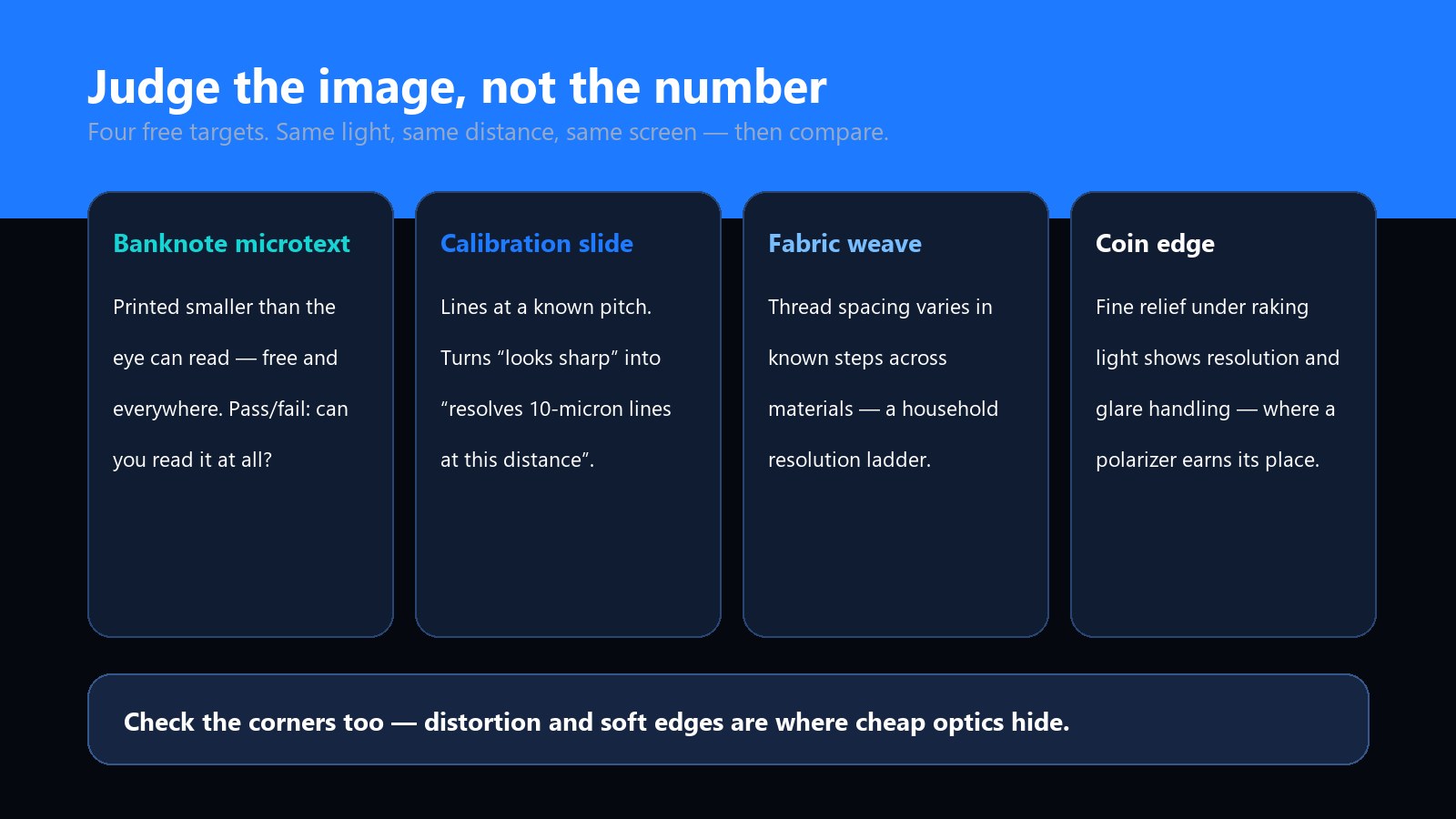
- Banknote microtext. Every major currency prints text too small to read unaided. It is free, it is everywhere, and "can you read it" is a pass/fail answer.
- A calibration slide. A glass slide with lines at a known pitch turns "looks sharp" into "resolves 10-micron lines at this distance" — the only phrasing that survives being quoted.
- Fabric weave. Thread spacing varies predictably across materials, so you can compare cameras against a known reference at home.
- A coin edge. Fine relief under raking light shows both resolution and how the camera handles glare — which is where a switchable polarizer earns its place.
Photograph the same target at the same distance under the same light, then inspect on the same screen. Check the corners as well as the centre — distortion and soft corners are where cheap optics hide. This is the same discipline we recommend for any imaging purchase: judge cameras by samples, not sensors.
What the range means on our line
Our two reference models bracket the trade. The UB-DM023A is the handheld: a 2 megapixel sensor streaming 1080P over WiFi to iOS and Android or over USB to Windows and macOS, a 10–200× range, a switchable on-body polarizer for glossy surfaces, and the four-nozzle kit that keeps working distance usable across the range. The UB-DM050U is the bench: 5 megapixels on a rigid stand, a 50–250× range, and the lighting geometry that a high pixel count needs to actually deliver. If your work moves around the part, handheld wins; if it lives at one station, the stand and the sensor do.
For OEM and ODM buyers
If you put a branded microscope into the market, the magnification claim is your support ticket, not just your marketing. Two habits keep it honest and cheap to defend. First, state the reference: a range printed with its display assumption, and optical versus digital labelled separately, answers most pre-sale questions and nearly all post-sale ones. Second, tune the image for the range you actually print — sharpness, white balance and low-light behaviour at the working distances your customers will use, which is exactly what our ISP tuning and software service covers. And as always in a briefing: ask for sample images on your target, not a datasheet number.
Common questions
Is 200× on a handheld microscope real magnification?
The enlargement on your screen is real — things genuinely appear that many times larger. But the figure is calculated against a reference display, so it describes the screen as much as the lens. The question that actually predicts satisfaction is what detail the camera resolves, and that is settled with a target test, not a spec sheet.
Why does the same microscope show a different magnification on my phone than on my monitor?
Because total magnification includes a display factor: display diagonal divided by sensor diagonal. A stream that reads about 200× on a 24-inch monitor reads roughly a quarter of that on a 6-inch phone screen. Nothing about the optics changed between the two screens.
Does a higher megapixel sensor mean higher magnification?
No. More pixels mean finer sampling of the same field of view — smaller features can be recorded, which is worth far more than a bigger number on the box. Magnification itself is still optics times display. The two specs multiply their usefulness only when the lighting supports them.
What magnification do I need for soldering and PCB work?
Most board-level work — checking joints, reading part markings, inspecting 0402-size components — sits comfortably in the middle of a 10–200× range; the top of the range is for chip-level forensics. Working distance and glare control decide usability more than the maximum figure does, which is why nozzle options and a polarizer matter on a handheld.
Can I compare two cameras by their magnification numbers?
Not meaningfully — the figures depend on each product's sensor and reference display. Photograph the same target at the same distance under the same light and compare the images on one screen. The camera that resolves more of the target wins, regardless of what either box printed.
What is empty magnification?
Enlargement beyond what the optics and sensor can resolve. Past that point, increasing magnification makes the blur bigger without revealing anything new — the picture grows, the information does not. It is the single most common cause of disappointment with high-number handheld scopes.